Documentation Index

Fetch the complete documentation index at: https://docs.paraminternationalltd.com/llms.txt

Use this file to discover all available pages before exploring further.

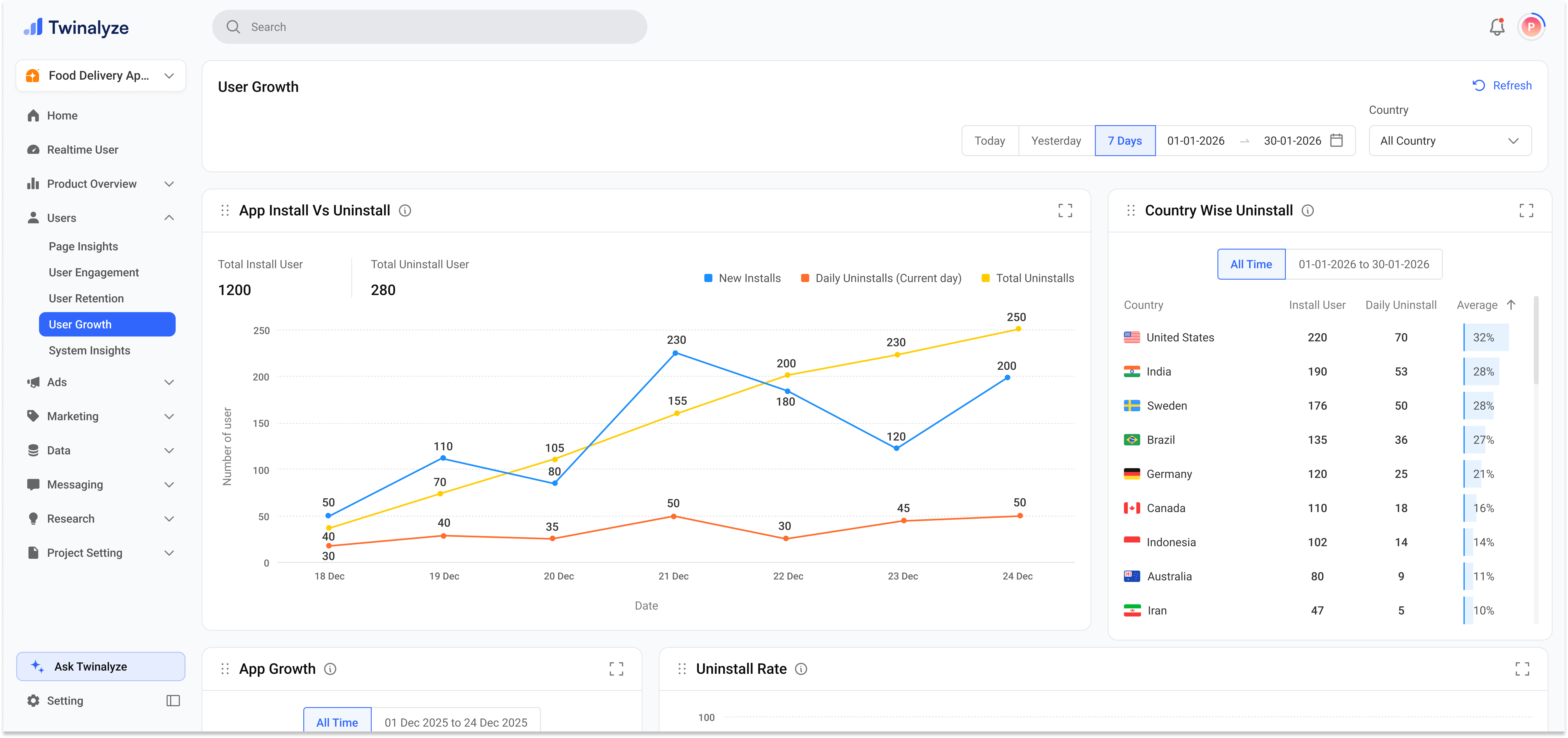
User Growth helps you understand how your app is growing over time.
1

Review growth overview

The top section shows the main growth trend for the selected date range and country.You can compare New Installs, Daily Uninstalls, and Total Uninstalls in one chart. The summary numbers above the chart help you quickly understand total installed users, total uninstalled users, and users who uninstalled on the same day.
Twinalyze User Growth overview
2

Review app growth and uninstall rate

The lower section helps you understand the balance between installed and uninstalled users.The App Growth chart gives a quick install vs uninstall split, while Uninstall Rate shows uninstall activity by selected time format such as daily, weekly, monthly, or yearly.
Twinalyze App Growth and Uninstall Rate

What this page shows

01
Install growth

Track how many new users installed your app during the selected period.

02
Uninstall behavior

Review daily uninstalls, total uninstalls, and same-day uninstall users.

03
Country impact

Compare install and uninstall behavior by country to understand market quality.


How to use User Growth

1

Select date range

Choose the time period you want to analyze.
2

Choose country

Select All countries or filter by one country to understand market-specific growth.
3

Review install and uninstall totals

Check Total Install User, Total Uninstall User, and Same Day Uninstall User.
4

Analyze the growth chart

Compare New Installs, Daily Uninstalls, and Total Uninstalls over time.
5

Check uninstall quality

Use Country Wise Uninstall, App Growth, and Uninstall Rate to understand where users are being lost.

Common use cases

Use New Installs and App Growth to understand whether your app is gaining users.
Use Daily Uninstalls, Total Uninstalls, and Uninstall Rate to find uninstall spikes.
Same-day uninstall users can indicate poor onboarding, wrong user expectations, bugs, or low first-use value.
Use Country Wise Uninstall to find countries with higher uninstall percentage.
User Growth helps your team understand installs, uninstalls, same-day uninstalls, country-wise uninstall behavior, and overall growth quality.