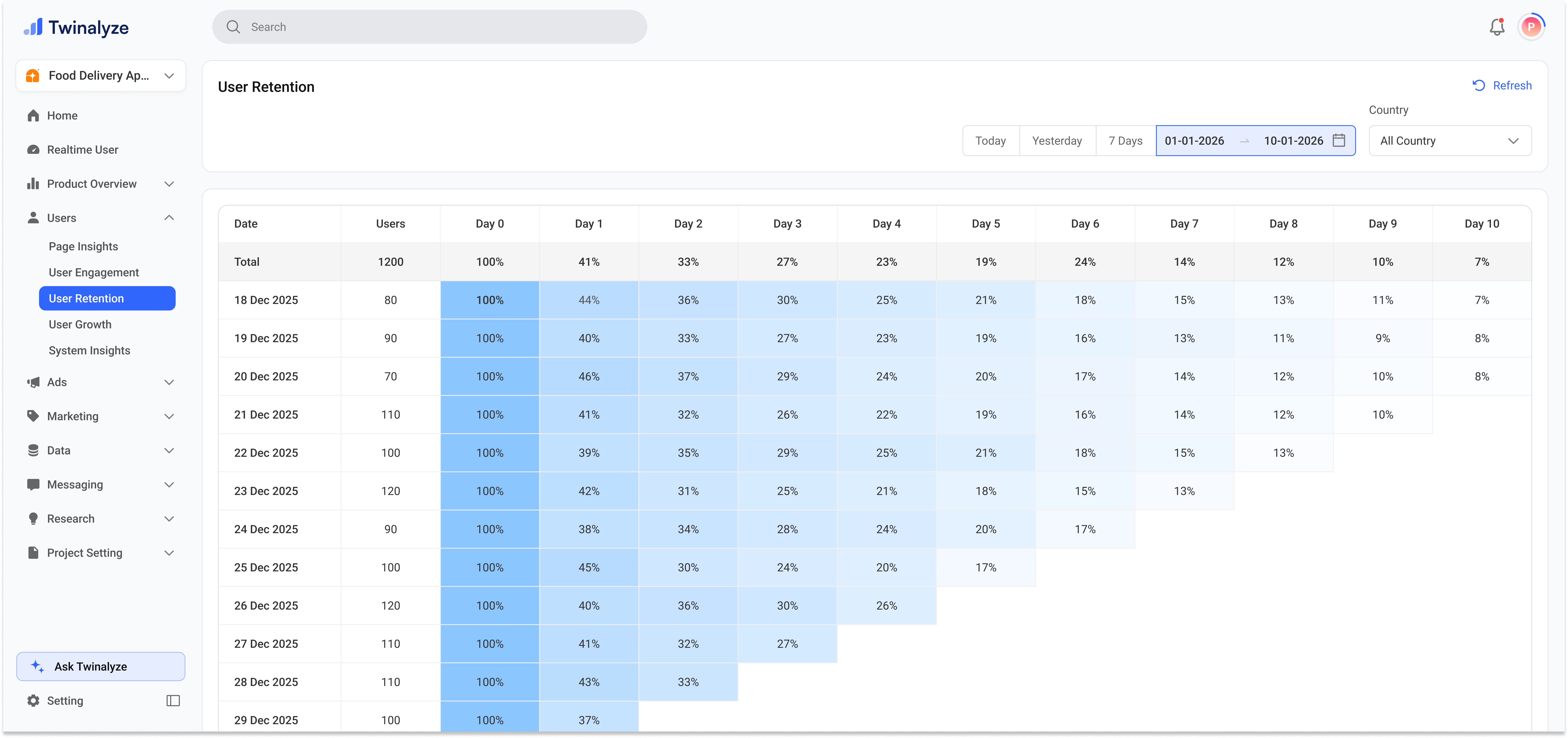
User Retention helps you understand how many users come back after their first activity date. The retention view groups users by date and shows how many of them return on Day 0, Day 1, Day 2, and later days.Documentation Index
Fetch the complete documentation index at: https://docs.paraminternationalltd.com/llms.txt
Use this file to discover all available pages before exploring further.
What this page tells you
01
User groups
Each date row represents users who became active on that date.
02
Return rate
Day columns show the percentage of users who returned after the first activity date.
03
Product stickiness
Higher retention means users are finding value and coming back again.
Retention timeline
Day-by-day view
Retention is read from left to right. Day 0 starts from the cohort date, and later days show how many users returned.
Day 0
First activity
Day 1
Next day
Day 2
Return check
Day 3
Repeat use
Day 4
Trend
Day 5
Stickiness
Day 6
Retention
Common use cases
Check if users come back
Use retention to understand whether users return after their first activity.
Find early drop-off
Find early drop-off
If Day 1 or Day 2 is low, users may not be finding enough value after first use.
Measure product stickiness
Strong retention means users are repeatedly engaging with your product.
User Retention helps your team understand repeat usage and long-term product engagement.