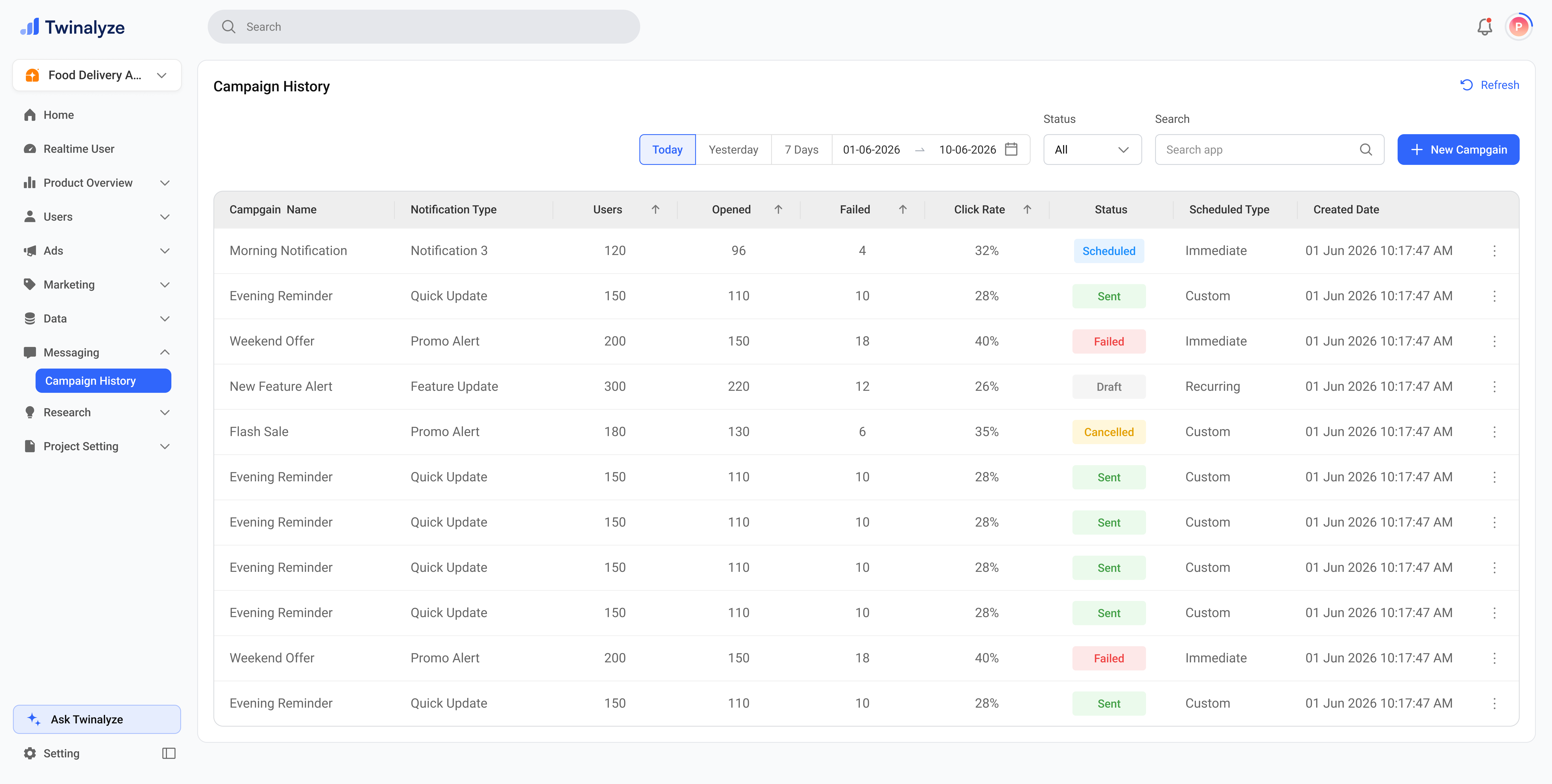
Campaign History helps you track all push notification campaigns in one place. Campaign History gives a table-based view of all notification campaigns with important delivery and engagement details.
Twinalyze Campaign History page

How Campaign History works

Campaign management flow

Review campaign status and performance from one table

01
Filter campaigns
Date · Status · Search

Select a date range, choose campaign status, or search by campaign name to quickly find the campaign you want to review.

02
Check performance
Users · Opened · Failed · Click Rate

Review how many users were targeted, how many opened the notification, how many failed, and the click rate for each campaign.

03
Review delivery status
Scheduled · Sent · Failed · Draft · Cancelled

Use status labels to understand the current state of every campaign and identify which campaigns still need action.

04
Manage campaign
Duplicate · Delete · New Campaign

Use the row action menu to duplicate or delete a campaign. Use New Campaign when you want to create a fresh push notification campaign.


Campaign statuses

Scheduled
Waiting to send

The campaign is created and scheduled for a future time.

Sent
Delivered

The campaign has been sent successfully.

Failed
Needs review

The campaign failed to send or some delivery issue occurred.

Draft
Not sent yet

The campaign is saved but not scheduled or sent.

Cancelled
Stopped

The campaign was cancelled before sending or completion.


Row actions

Each campaign row has an action menu for quick management.

Duplicate

Reuse an existing campaign setup

Duplicate is useful when you want to create a similar campaign using the same structure, notification type, or audience setup.

Delete

Remove an unwanted campaign

Delete removes the selected campaign from Campaign History. Use this carefully for drafts, test campaigns, or campaigns no longer needed.


Common use cases

Use the Status column to confirm whether the campaign is Sent, Scheduled, Failed, Draft, or Cancelled.
Use the Status filter or Failed column to find campaigns that need delivery review.
Use Opened and Click Rate to compare which campaigns performed better.
Use Duplicate when you want to create a similar campaign without starting from zero.
Click New Campaign to start a new push notification campaign.
Campaign History helps you monitor campaign delivery, engagement, status, schedule, and actions from one clean view.