Documentation Index

Fetch the complete documentation index at: https://docs.paraminternationalltd.com/llms.txt

Use this file to discover all available pages before exploring further.

Product Overview gives you a complete summary of how your app or website is performing.
1

Review product health

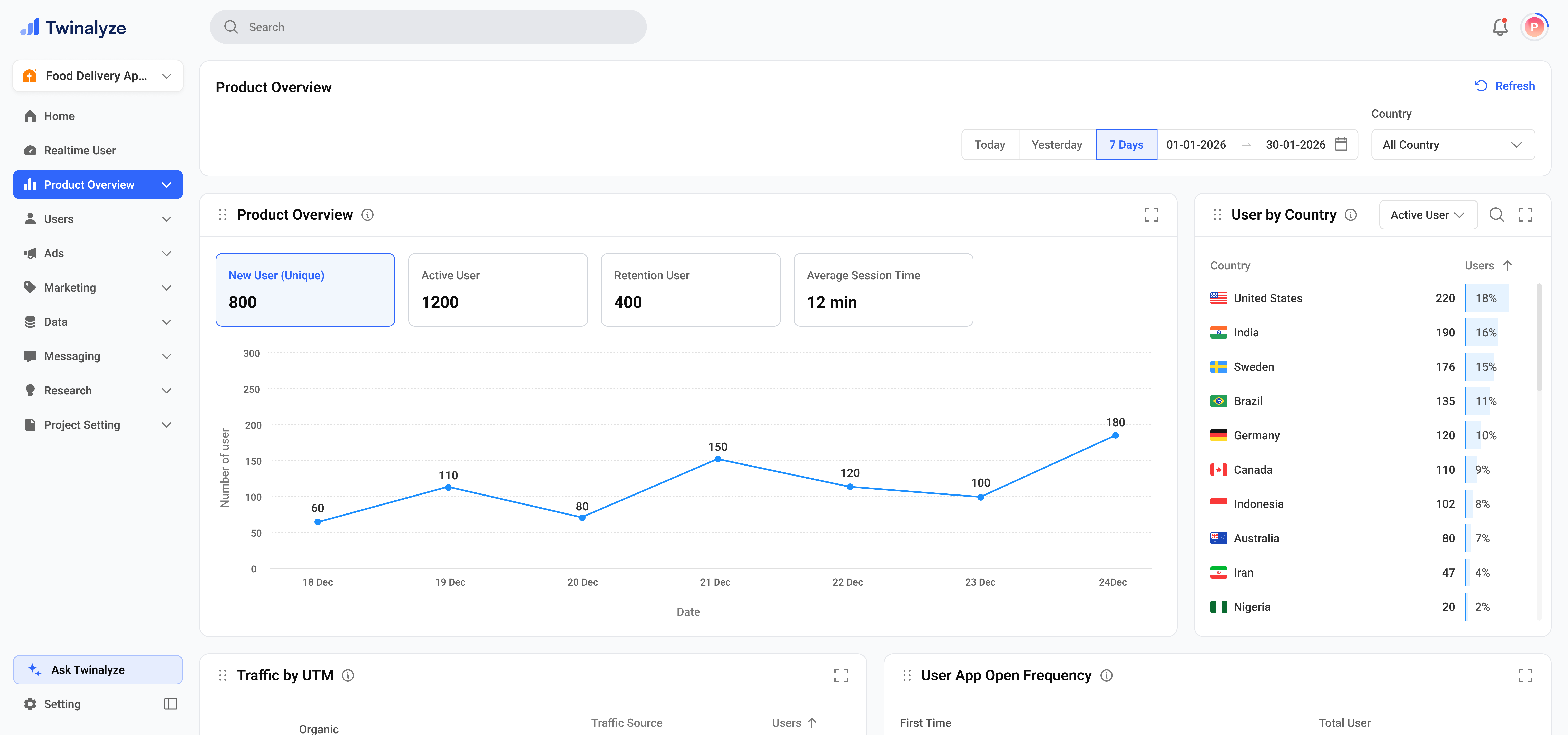
The top view gives a quick summary of your product performance. You can check new users, active users, retention users, average session duration, and country-wise active users.This view is useful when you want a fast answer to: How is my product performing today?
Twinalyze Product Overview main dashboard
2

Understand acquisition and app opens

This section shows where users are coming from and how many times they opened the app.It helps you understand which traffic source brings users and whether users open the app only once or return multiple times.
Twinalyze User Acquisition and App Open Frequency
3

Review page depth and permissions

This section explains how many pages users view on average and how users respond to permissions.It helps you understand browsing depth and whether users are allowing or denying important app permissions.
Twinalyze Average Page Visit and Notification Permission
4

Check retention and ratings

This section shows whether users are returning after their first activity and how app ratings are distributed by country.It is useful for understanding user loyalty and country-wise product feedback.
Twinalyze User Retention and App Ratings
5

Analyze versions and growth

This section shows which app versions users are using and how installs compare with uninstalls.It helps you understand update adoption, old version usage, and overall app growth.
Twinalyze Version Distribution and App Growth

How to use Product Overview

1

Select date range

Choose Today, Yesterday, 7 Days, or a custom date range based on the period you want to review.
2

Choose country

Select All countries or a specific country to compare product performance by region.
3

Start with the top metrics

Review new users, active users, retention users, and average session duration to understand product health.
4

Check traffic and engagement

Review acquisition source, open frequency, average page views, and notification permissions.
5

Review retention and growth

Check user retention, version distribution, and app growth to understand long-term product quality.

Common use cases

Use top metrics to quickly check active users, retention users, and average session duration.
Use User Acquisition by Source to see which platforms or campaigns bring the most users.
Use app open frequency and average pages viewed to understand how strongly users interact with the product.
Use Notification Permission to see where users allow or deny important app permissions.
Use Version Distribution to understand how many users are on old or new app versions.
Use App Growth to compare installs and uninstalls and understand whether your product is growing steadily.
Product Overview gives your team a simple product health summary across users, traffic, engagement, retention, versions, and growth.