Documentation Index

Fetch the complete documentation index at: https://docs.paraminternationalltd.com/llms.txt

Use this file to discover all available pages before exploring further.

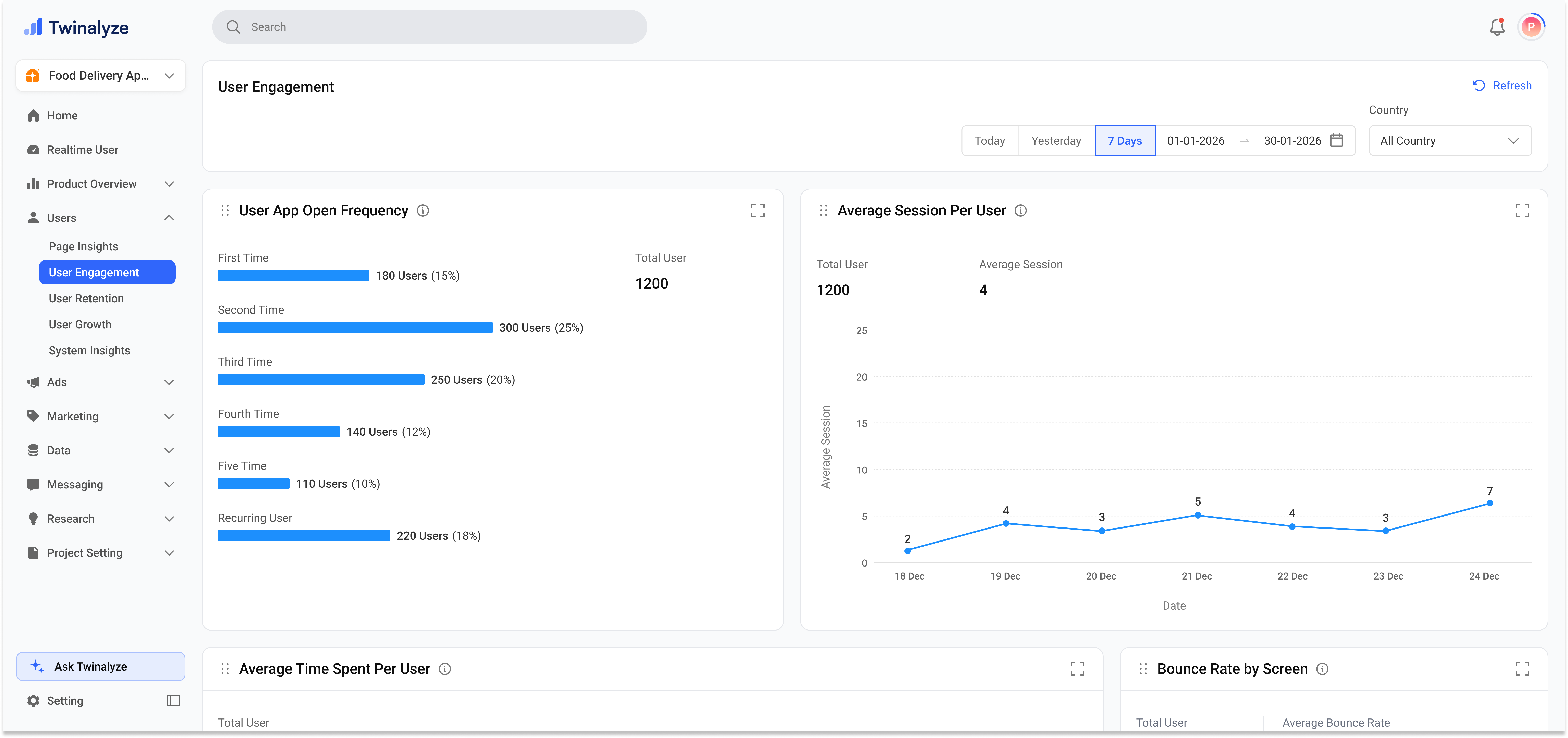
The User Engagement page shows two main reports: App Open Frequency and Average Sessions Per User.
Twinalyze User Engagement page

What this page shows

01
App open frequency

Shows how many users opened the app for the first time, second time, third time, fourth time, fifth time, and how many became recurring users.

02
Average sessions per user

Shows the average number of sessions opened by users over time. This helps you understand how often users return and interact with your product.


How to read this page

1

Select the date range

Choose the time period you want to analyze, such as Today, Yesterday, 7 Days, or a custom range.
2

Choose country

Select All countries or filter by a specific country to understand regional engagement.
3

Review app open frequency

Check how many users opened the app once, multiple times, or became recurring users.
4

Check average sessions

Use the line chart to understand how average sessions per user changed over time.
5

Compare engagement quality

More recurring users and higher average sessions usually indicate stronger user engagement.

Common use cases

Use app open frequency to understand how many users return after their first app open.
Check the Recurring User group to understand how many users are repeatedly opening the app.
Use Average Sessions Per User to see whether engagement is increasing or decreasing over time.
Use the country filter to compare user engagement across different markets.
User Engagement helps your team understand repeat usage, recurring users, and average sessions per user.