Documentation Index

Fetch the complete documentation index at: https://docs.paraminternationalltd.com/llms.txt

Use this file to discover all available pages before exploring further.

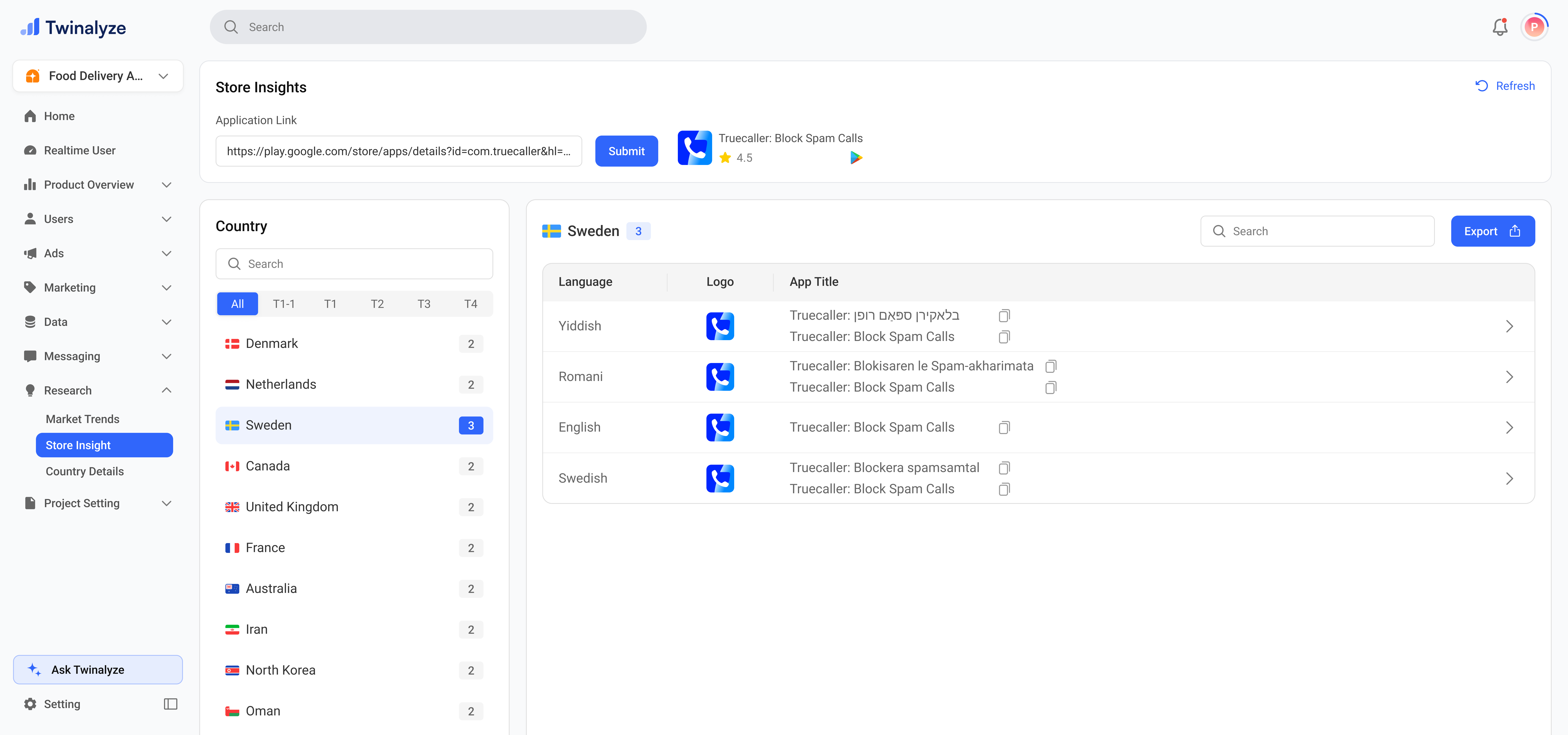
Custom Store Listing helps you check how an app appears across different countries and languages.
Twinalyze Custom Store Listing page

Custom Store Listing overview

Store listing research

Custom Store Listing helps you review app listing information by country, tier, language, logo, and app title.

SectionWhat it doesBest for
App Link & Package ID
App lookup input
Lets you enter an app store link or package ID to fetch custom listing information.Checking listing data for a specific app.
Country Panel
Country and tier selection
Helps you select countries using search and tier tabs such as All, T1, T1-1, T2, T3, and T4.Country-wise listing comparison.

Listing table columns

Custom listing columns

These columns help you understand how the app is presented in different countries and languages.

ColumnMeaningUse for
LanguageShows the language used for the app listing.Localization review.
LogoShows the app logo used in the selected store listing.Brand and visual check.
App TitleShows the localized app title for the selected country or language.Title and keyword research.

Common use cases

Review how the app title appears in different countries and languages.
Use tier tabs and country search to compare listing details across markets.
Enter a competitor app link or package ID to study their store listing setup.
Use language, title, and logo data to plan country-wise localization improvements.
Export results when you need to share listing data with product, marketing, or growth teams.